✦ Case Study · 03
Qarlot
Order Management System
Designing an intuitive, mobile-first order management experience that gives retailers real-time tracking, automated shipping integration, and full visibility over their delivery operations.
Overview
Millions of retailers can't see where their orders are.
Today, millions of retailers manage customer orders through a fragmented mix of WhatsApp messages, spreadsheets, and phone calls. The result: delayed deliveries, unhappy customers, and operational chaos.
Qarlot (powered by the Mr Deliver platform) needed a mobile-first order management system that could give retailers a centralized dashboard, real-time tracking, and automated shipping workflows — all accessible from their phone.
12+
App screens across all flows
5
Core solutions delivered
The Problem
Manual order management is breaking small businesses.
Problem Statement
Retailers face inefficient order tracking, lack of real-time updates, and complicated fulfillment workflows — resulting in delayed deliveries, miscommunication with customers, and operational inefficiencies that directly damage revenue and reputation.
Key challenges from research
- No real-time order status visibility for retailers or customers
- Manual fulfillment updates — error-prone and time-consuming
- Poor third-party logistics integration
- Zero mobile accessibility for on-the-go order management
- Returns and refunds managed manually with no structured flow
- No performance data or operational analytics
Objectives
- Central dashboard to view, filter, and track all order statuses
- Seamless status updates: Processing → Shipped → Delivered
- Shipping provider integration and label generation
- Mobile-friendly UI that works on the go
- Automated customer notifications at each stage
- Structured returns and dispute resolution flow
User Research
Understanding Emma — the retailer who just wants orders to work.
User interviews with small and mid-sized retailers revealed consistent patterns. I distilled research into a primary persona that guided every design decision:
EJ
Emma Johnson
Owner of a Growing Online Boutique · 34 · New York
"I started on social media, but as orders grew, managing them manually became overwhelming. I can't track shipments properly, customers keep asking where their orders are, and I'm constantly switching between five different apps just to ship one order."
Emma's goals
- One dashboard to track all orders without switching apps
- Real-time status updates she can share with customers
- Simple shipping integration — assign provider, generate label
- Mobile access to manage orders anywhere
- Automatic notifications so she doesn't have to message customers
Emma's pain points
- Switching between platforms to update each order manually
- No automated system for tracking — customers chase her constantly
- Coordinating with shipping providers is error-prone
- Orders get lost or delayed due to miscommunication
- Returns are handled differently each time — no system
Design Process
Four phases. Discover → Define → Ideate → Design.
Discover
User Interviews
Interviewed retailers about current workflows, pain points, and what success looks like for them day-to-day.
Define
Task Mapping
Mapped four core task flows: order tracking, status updates, shipping management, and issue resolution.
Ideate
Competitor Analysis
Benchmarked Shopify, Zoho Inventory, and logistics platforms — identifying gaps in the African market context.
Design
Hi-Fi UI
Mobile-first screens from onboarding through to live tracking, built around the Eisenhower matrix of user priorities.
KPI Defined
To measure success, I defined a key metric: Order Processing Efficiency Rate (OPER) — the percentage of orders processed on time. The design directly targets OPER improvement through automation, real-time tracking, and streamlined status updates.
The Design
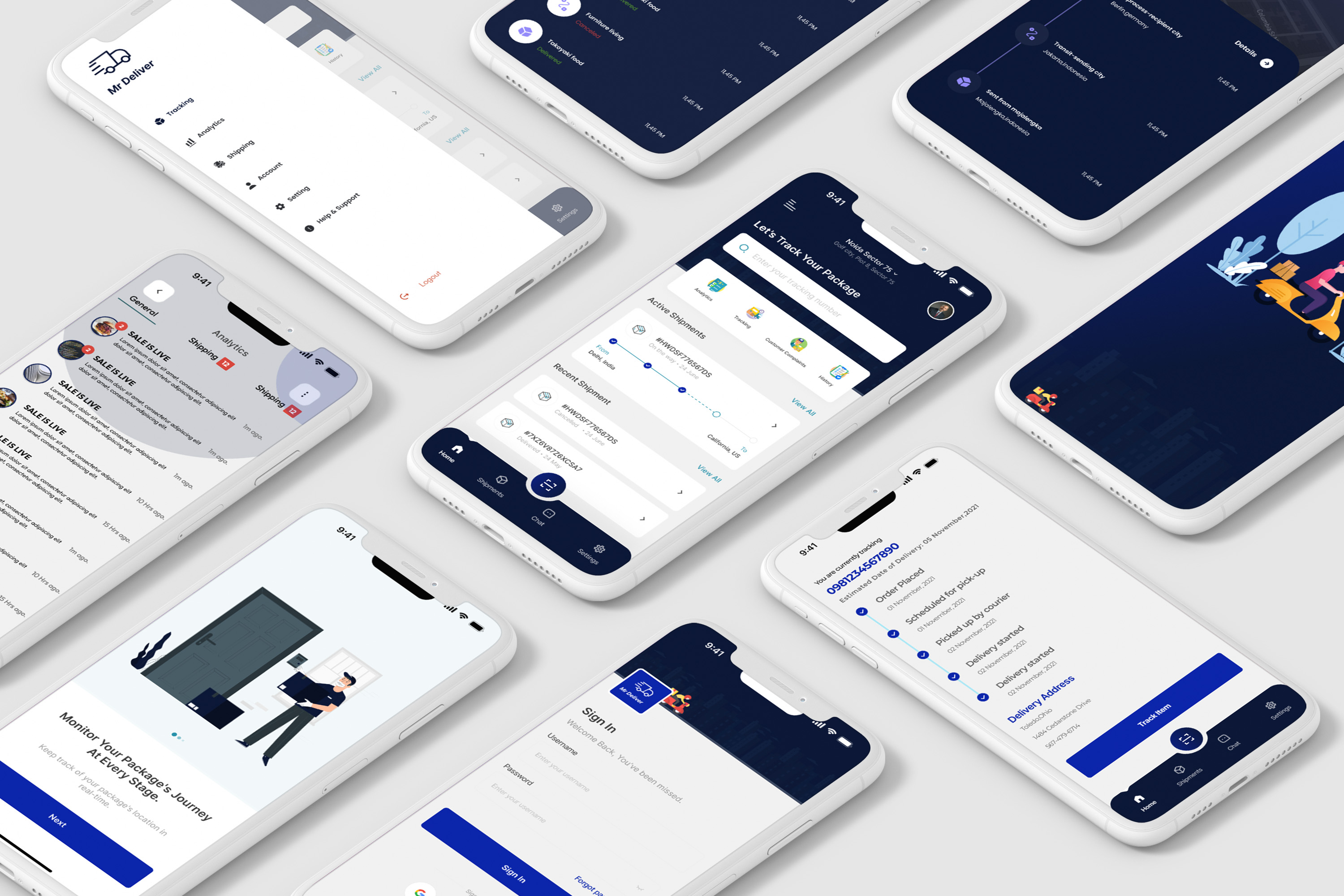
Screens from the final UI.
Every screen was designed mobile-first, with a clear visual hierarchy that lets retailers act fast — status updates in one tap, live tracking visible immediately, and shipping management accessible from a single menu.
ONBOARDING · SIGN IN · HOME DASHBOARD · LIVE TRACKING
ORDER HISTORY · SHIPMENT ROUTE · NOTIFICATIONS · STATUS TIMELINE
Solutions Delivered
Five problems solved. One platform.
✅ Real-time tracking
- Live order status visible from dashboard
- Map-based delivery tracking for customers and retailers
- Automated status progression: Processing → Shipped → Delivered
✅ Shipping integration
- Assign delivery partners from within the app
- Generate shipping labels without leaving the platform
- Update tracking numbers automatically
✅ Smart notifications
- Automated customer alerts at each order milestone
- Push notifications for retailers on status changes
- Reduces customer support queries dramatically
✅ Mobile accessibility
- Full order management from any smartphone
- Optimized for low-bandwidth environments
- Cloud sync ensures data is always current
Outcomes
Faster delivery cycles. Fewer errors. Clearer operations.
↑
OPER — order processing efficiency
↓
Manual errors through automation
1
Platform replacing 5+ manual tools
Retailers now benefit from a unified platform that consolidates orders, automates logistics, and enhances customer communication — resulting in faster delivery cycles, fewer errors, and improved operational clarity.
Mobile-first UX
Real-time Tracking
User Persona Research
Competitor Analysis
Task Flow Mapping
Shipping Integration
E-commerce
Lessons Learned
Mobile-first design for operational tools demands ruthless prioritization. Retailers in fast-moving environments need the most critical action — updating an order status — to be reachable in two taps maximum. Every additional step is a potential failure point in a busy fulfilment environment.